NVIT: customs declaration for consignments
NVIT (Norske Varer I Transit, Norwegian Goods in Transit) lets you enter a customs declaration per order line when a consignment between two Norwegian locations is transported via Sweden or Finland. Here is how to use it.
TABLE OF CONTENTS
What NVIT is
NVIT applies to Norwegian goods where both sender and recipient are in Norway, but where the transport goes via Sweden or Finland, typically between southern and northern Norway. Even though the goods are Norwegian and are not to be sold abroad, they must be customs declared with an HS number and item details because they cross national borders in transit.
NVIT is not intended for ordinary foreign consignments, that is, goods that are actually to be sold or delivered abroad. Those follow ordinary export routines. The carrier agreement with Logistra must support NVIT.
Enabling NVIT
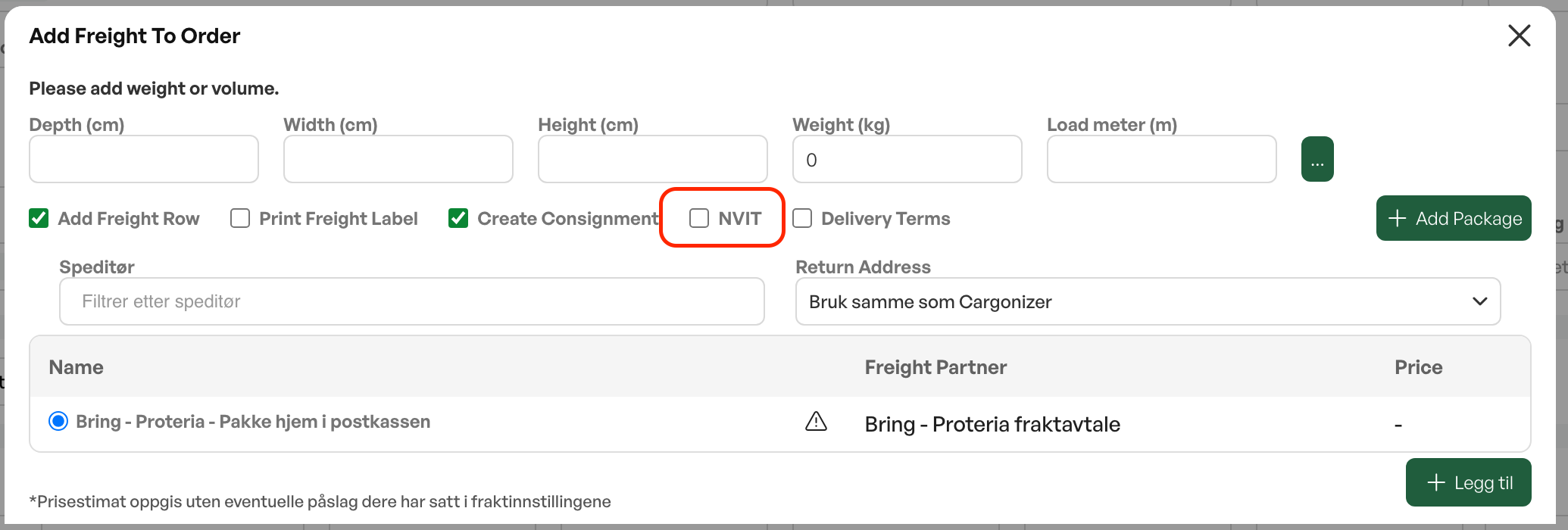
In the freight dialog (Add freight on an order) you tick NVIT and click Add. The main panel is hidden, the NVIT panel opens, and Telaris fetches customs data for the selected order lines from the product cards and shows them in a table with one row per order line.
The NVIT table
The table has one row per order line with these fields:
Product (product name, not editable)
Qty (quantity)
HS no. (customs tariff number, required)
Description (item description, required)
Gross wt (gross weight in kg, required and must be greater than zero)
Net wt (net weight, optional)
Origin (country of origin as two letters, for example NO)
Currency (currency as three letters, for example NOK)
Amount (amount).
Go through the rows, fill in what is missing, and click Next. The consignment is then created as usual, but with NVIT data sent to Logistra.
Auto-fill from the product card
For the fields to be filled in automatically, the products should have a weight on the product card (used as net weight), a customs code (HS number) on the catalog product, and country of origin registered as a two-letter ISO code (for example NO, SE, DE) or via a country link. If the country of origin is free text, for example "Norge", the field is left empty. Products that lack this information must be filled in manually in the table before the consignment can be sent.
Limitations
NVIT is set per consignment. There is no setting to always use NVIT, so you must tick it for each transit consignment. All selected order lines must have NVIT data filled in, otherwise you get an error. If you turn off NVIT after filling in data, the system warns that the data will be reset. The freight line itself is not included in the NVIT table, only ordinary order lines.
NOTE: Country of origin must be a two-letter ISO code (NO, SE, DE) to be fetched automatically. Free text such as "Norge" is not picked up.

Was this article helpful?
That’s Great!
Thank you for your feedback
Sorry! We couldn't be helpful
Thank you for your feedback
Feedback sent
We appreciate your effort and will try to fix the article