Invoice options on the customer card
Options and settings on the customer card that affect a specific customer's invoicing rules
TABLE OF CONTENTS
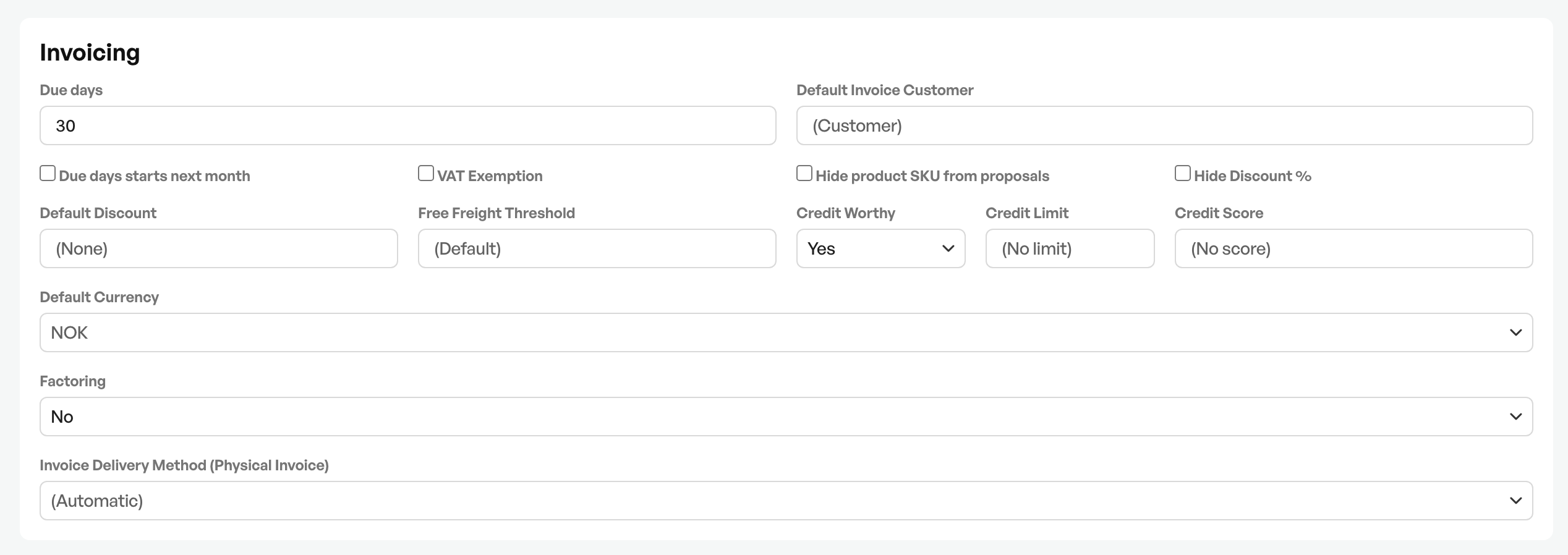
Due days
On the customer card you can set default due days that override the system's configured due days.
To change the default due days in the system, contact the administrator.
Default invoice customer
The option to set another customer as the default invoice recipient on a customer. Most often used with larger companies with several departments, where the invoice should be sent to a main card or finance departments.
When using a default invoice customer, the invoice customer's financial options are used.*
*Some settings can be configured to use values from the order customer.
VAT exemption
Option to set the customer with a default exemption from VAT. Most often used for customers not registered in Norway. With VAT exemption enabled, all the customer's order lines are saved with 0% VAT.
Hide product number and discounts
By turning on hiding the product number from quotes, quotes created for the customer are shown on the PDF without the product number.
By turning on hiding discounts, discounts given on an order are not shown on the quote, order confirmation and invoice.
Base discount
The option to set a flat percentage discount for the customer on all orders.
Freight - Free freight threshold
*Requires Telaris webshop
With Telaris Webshop you can set an amount the customer can shop for that activates free freight. The default value is none, so no freight discount is activated.
Credit limit
See separate article
Guide credit block
Invoice profile
Option to set an invoice profile as the default invoice handling for the customer.
Guide invoice profile TBA
Delivery method for invoice
Option to set a default sending method for the customer. If no choice is made, all options are available.
A lookup against PEPPOL is done automatically in Telaris, and if the customer can receive EHF, the EHF button appears automatically in the invoice dialog.
Telaris also shows that the customer is found in PEPPOL on the customer card, next to the delivery method.
Note: The 'Always try EHF' function is only used if you know the recipient can receive EHF but, for unknown reasons, has not been found in PEPPOL.

Was this article helpful?
That’s Great!
Thank you for your feedback
Sorry! We couldn't be helpful
Thank you for your feedback
Feedback sent
We appreciate your effort and will try to fix the article