Tripletex – Accounting
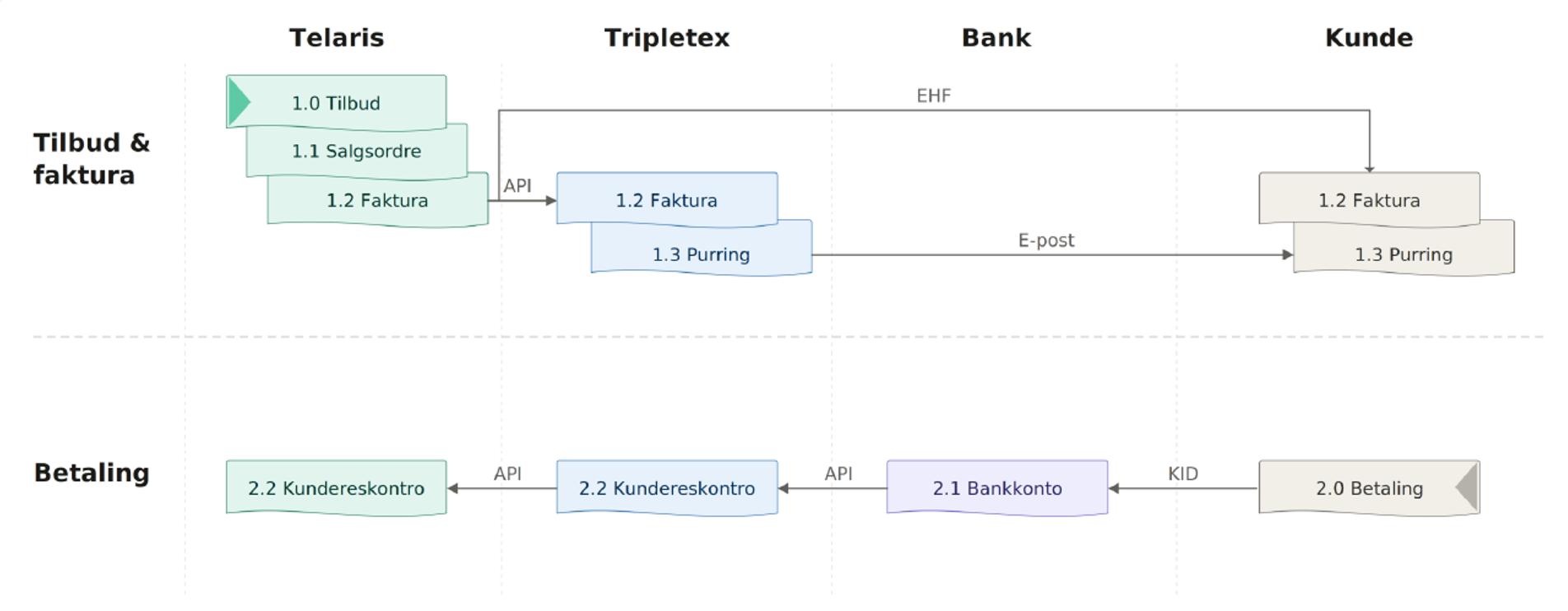
Tripletex – Accounting handles the entire accounting flow between Telaris and Tripletex, including export of invoices, credit notes, and vouchers, registration of payments in Tripletex, and import of payment status back to Telaris.
The module ensures that financial data flows automatically between the systems so that invoices, accounts receivable, and payment status are always up to date.
TABLE OF CONTENTS
- Tripletex – Accounting
- Tripletex – Accounting – Introduction and setup
- Tripletex – Accounting – Overview of the accounting flow
- Tripletex – Accounting – Troubleshooting
Tripletex – Accounting – Introduction and setup
Tripletex – Accounting is the core module of the Tripletex integration and is always used when Telaris is connected to Tripletex as the accounting system.
The module handles:
Export of invoices to Tripletex
Export of credit notes
Export of vouchers and postings
Registration of payments in Tripletex
Import of payment status back to Telaris
Automatic update of accounts receivable
When the module is enabled, invoices created in Telaris are automatically posted in Tripletex via batch export. When a payment is registered in Tripletex, the payment status is synchronised back to Telaris.
This lets users work operationally in Telaris while Tripletex functions as the finance and accounting system in the background.
Tripletex is used as the main financial system, while Telaris handles orders, invoice basis, and operational workflow.
Tripletex – Accounting – Overview of the accounting flow
When an export batch is run in Telaris, financial data is sent automatically to Tripletex via the API.
The system handles different types of financial data differently:
Customer invoices are exported as order invoices
Credit notes are linked to the original invoice
Other postings are exported as vouchers
Payments are registered directly on the invoice in Tripletex
Guide: Batch transfer
Invoice export to Tripletex
On export, Telaris creates an order invoice in Tripletex with customer, invoice lines, accounts, VAT, and payment reference.
During export, the following happens automatically:
The customer is linked or created in Tripletex
Products are created automatically when needed in Tripletex
Account numbers are linked to the chart of accounts in Tripletex
The VAT type is inherited from the account in Tripletex
The invoice PDF is uploaded to Tripletex as documentation
The KID/payment reference is sent with the invoice
The invoice is posted in Tripletex but is not sent to the customer from there. Customer communication is handled from Telaris.
Creating the invoice is done in Telaris
Payment flow between Tripletex and Telaris
Tripletex – Accounting does not only handle export of invoices. The module also synchronises payment status back to Telaris.
This means that accounts receivable and invoice status in Telaris always reflect what is registered in Tripletex.
Typical payment flow:
Invoice is created in Telaris
Invoice is exported to Tripletex
The customer pays the invoice
Payment is registered in Tripletex (bank, AvtaleGiro, or manually)
The Tripletex integration fetches payment status automatically
Telaris updates the invoice and accounts receivable automatically
A background job runs that checks open invoices in Tripletex and imports new payments back to Telaris.
This also applies to partial payments and payments registered directly in Tripletex.
When an invoice is paid in Tripletex, the payment is fetched to Telaris and shown on the invoice in Telaris, as in the image below.

Users do not need to register the payment manually in Telaris when the payment is already registered in Tripletex.
Vouchers, credit notes, and payments
Not all postings are exported as invoices.
The system uses different export types depending on the transaction:
Customer invoices → order invoices
Credit notes → credit note linked to the original invoice
Payments → payment registration on the invoice
Tripletex uses numbered voucher types (blgart), and Telaris can be configured to use different voucher types for different transactions. The voucher types are predefined in Telaris and rarely need to be updated.
NOTE: Voucher types are global settings and apply to all export batches.
Account mapping and VAT handling
The Tripletex integration uses automatic account mapping based on account number.
There is no manual mapping table between Telaris and Tripletex. The account numbers in the product classes in Telaris must therefore exist in the chart of accounts in Tripletex.
VAT is also handled automatically:
Telaris does not send the VAT code directly
Tripletex uses the VAT type configured on the account
The VAT code and VAT rate are therefore determined in Tripletex
A wrong VAT type on the account in Tripletex will give wrong VAT on exported postings.
NOTE: The account numbers in Telaris and Tripletex must be identical. If the account is missing in Tripletex, the export will fail.
Guide: Product classes
Guide: Chart of accounts
Tripletex – Accounting – Troubleshooting
Guide: Troubleshooting - Tripletex Accounting

Was this article helpful?
That’s Great!
Thank you for your feedback
Sorry! We couldn't be helpful
Thank you for your feedback
Feedback sent
We appreciate your effort and will try to fix the article